The bit-perfect music player for your own library, on iPhone and Android. Bit-perfect DSD over DoP, CUE albums, a real parametric EQ, and every step from the file to your DAC, in plain sight.
iPhone: iOS 17 or later · Android beta via Firebase · iPad and Mac in testing
● Original samples · no conversion · no processing
Your library, on
STERIOids.
Same files. Every bit intact. Just a lot more muscle.
Your music stays where it is. Sterio plays it from
Jellyfin
Your existing server
Plex
Your Plex music library
Navidrome
And other Subsonic servers
SMB shares
Straight from the NAS
UPnP / DLNA
Any media server
Local library
A music folder on your device, indexed
Radio Paradise
Lossless FLAC radio
Every step, from the file to your DAC.
Most players hide what happens to your music. Sterio shows it: the source format, how it travels, what decodes it, whether anything changes the samples, and the rate your output really runs at.
- Reported facts and configured settings
- A signal light: green, orange, red or grey
- A warning when the output rate doesn't match the source
- The same view for a Mac, a phone or a network streamer you control
Know your signal.
Live information from your server and audio session.
FLAC · 24-bit · 96 kHz
Sterio Server file metadata
Original file · Direct play
No server conversion requested
AVFoundation
Native audio engine
None
Equalizer off · volume at unity
USB DAC
96 kHz · audio session follows the source
Sent bit-perfect
No conversion, no processing. Your DAC gets the original 24-bit / 96 kHz.
Check your DAC: it should show 96 kHz.
The signal light
A light beside Signal Path tells you at a glance. Sterio can see what it sends, not what your DAC receives, so green means sent bit-perfect, and your DAC's display confirms it.
Sent bit-perfect
No conversion, no processing. Your DAC gets the original 24-bit / 96 kHz.
Check your DAC: it should show 96 kHz.
Equalizer is on
The equalizer alters the signal.
Resampled by the system
Speaker plays at 48 kHz, not the file's 44.1 kHz.
The equalizer alters the signal.
Every issue gets its own line, worst first.
Can't be confirmed
The AirPlay receiver sets its own rate; it cannot be checked from here.
Everything your library deserves.
The features I wanted from a music player, and couldn't find in one place.
DSD, the way it was recorded.
Bit-perfect DSD over DoP to your USB DAC, with no conversion to PCM. Needs a USB DAC that accepts DoP.
How it worksDisc images, played as tracks.
Sterio Server plays album images with CUE sheets track by track, and can split them into sample-accurate files. The original is never touched. From other sources, the image plays as one file.
How it worksOne copy of every album.
Your phone can't play that DSD album? Sterio Server converts it on the fly, and only then. If your device can play the original, that's what you get.
Tune it, or leave it alone.
A six-band graphic EQ, or a parametric EQ with up to 16 filters. Import AutoEQ and Equalizer APO presets, share yours as text. Off means off: bit-perfect again.
How it worksMulti-disc albums
CD1 and CD2 folders become one album, with a header for each disc.
Offline downloads
Take albums with you. They play from the phone, original format kept.
Home that listens
Daily mixes and genre picks made from your own library and history.
Radio Paradise
Lossless FLAC streams, built in, for when you want someone else to choose.
Start on the phone. Finish on the big system.
Every Sterio device on your network sees the others. Pick up the queue on another device, control it from the couch, or send it to a streamer, and the Signal Path follows along.
Link as many devices as you like, with a link code or through a listener profile. Linked devices share one listening session: each one sees what any of them plays. Needs Sterio Server 0.2.17 or later.
MacBook Pro
USB DAC · exclusive, at the source rate
iPhone
USB-C DAC, AirPods or speaker
Living room
BluOS · UPnP
Streamers get the original file whenever they can play it. DSD files are sent as-is to streamers that play them.
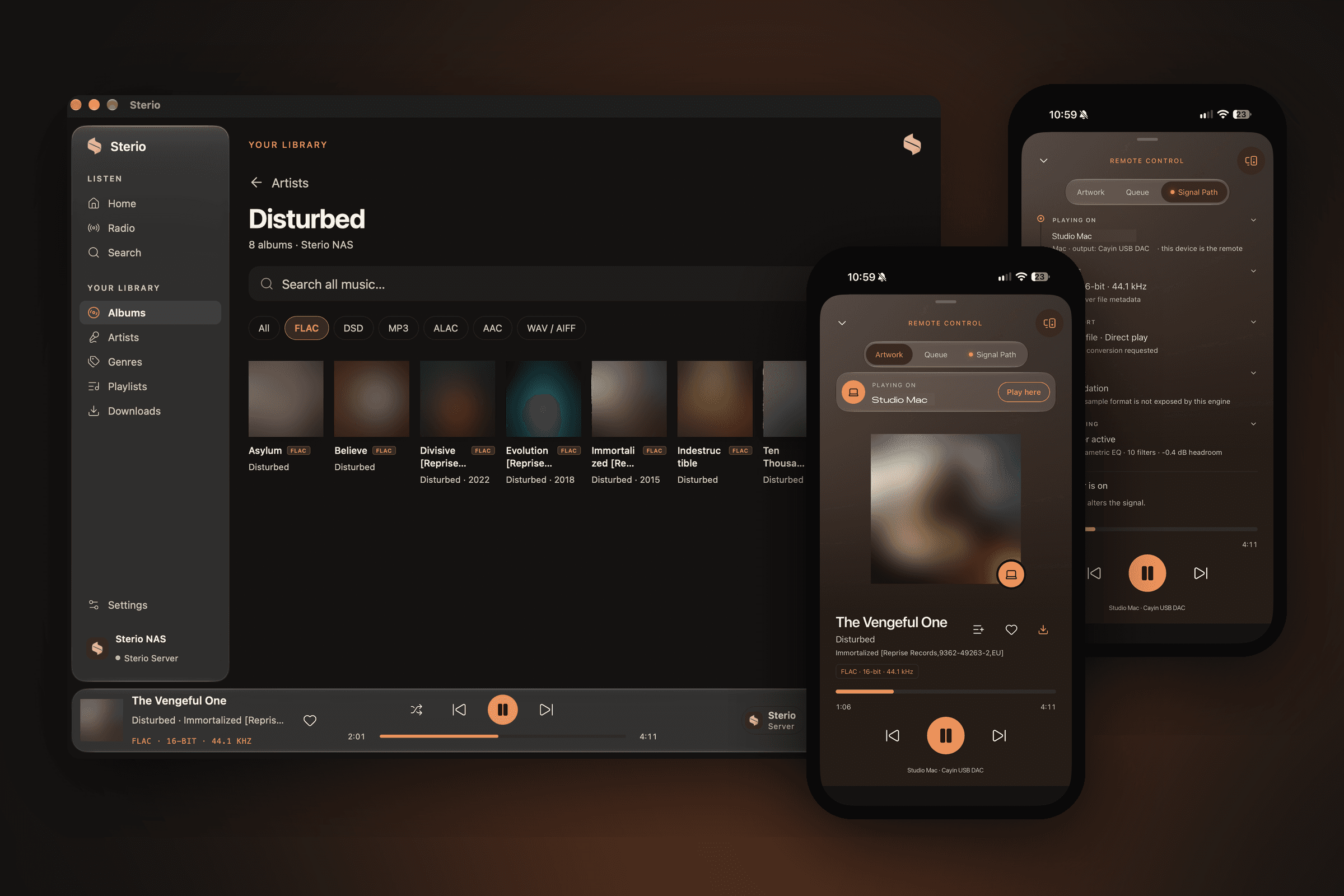
Your devices, one circle.
With Sterio Server, your iPhone, iPad and Mac form a circle. One plays, the others see it and control it, and the music moves to whichever device you pick, queue and position included. Your own server keeps the circle, with no cloud in between.
 Sterio Server
Night Bus
Northbound · on Living room Mac
Tap a device to move the music there.
Listening sessions
LiveLiving room Mac · Playing
Night Bus
Northbound
Listening: This iPhone, Kitchen iPad
Leave sessionStudy iPad · Paused
Lantern Street
Ilse Morrow
Listening: Nobody else
JoinListening sessions shows every device that plays, and who listens along.
Link
With a short code, by making a device discoverable, or by joining the same listener profile. Links chain, so A–B and B–C puts all three in one circle.
Share
Every device in the circle sees what's playing: the track, the artwork, the progress and the Signal Path of the device that plays.
Switch
Play here pulls the queue and position to the device in your hand. Play on sends it to another one. It keeps playing, from the same second.
Step out
Leave the session to listen to something else on one device, and join again when you like.
Only with Sterio Server 0.2.17 or later, on iPhone, iPad and Mac, at home and away when your server is reachable from the internet. The Listening sessions button, with Join and Leave, is in the current iPhone and iPad beta.
How to use Sterio CircleA small server that knows your music.
Optional, and in public beta: Sterio plays without it. Sterio Server runs in Docker on your NAS, or on a Mac. Point it at your music folder or a share on your NAS, and it indexes your library, keeps your playlists and history, and converts a file only when the device asking for it can't play the original.
- No account, your library stays on your NAS or Mac
- Never changes or deletes your music
- Multi-disc albums and compilations grouped properly
- Optional sample-accurate CUE splitting
- Full-size artwork, with thumbnails for phones on data
- A web dashboard for libraries, listeners and devices
- Link a friend's server and play their library too
›Watching /Volumes/Music
›12,480 tracks · 1,036 albums
›CD1 + CD2 merged · 41 albums
›CUE sheets found · 88 albums
›Artwork cached · 2000 px
Ready on 192.168.1.20:7766
Questions, answered.
Something missing? Write to support@sterioapp.com, I read everything.
The samples in your file leave Sterio unchanged: no resampling, no volume scaling, no EQ. Sterio checks each step and only says Sent bit-perfect when every one of them holds; your DAC's display confirms what arrives. When something changes the audio, the Signal Path tells you what and where.
Hear your library
as it was made.
Sterio is in public beta on iPhone and Android, with iPad and Mac versions in testing. Bring your library, keep your files, hear every bit.